

Opqo

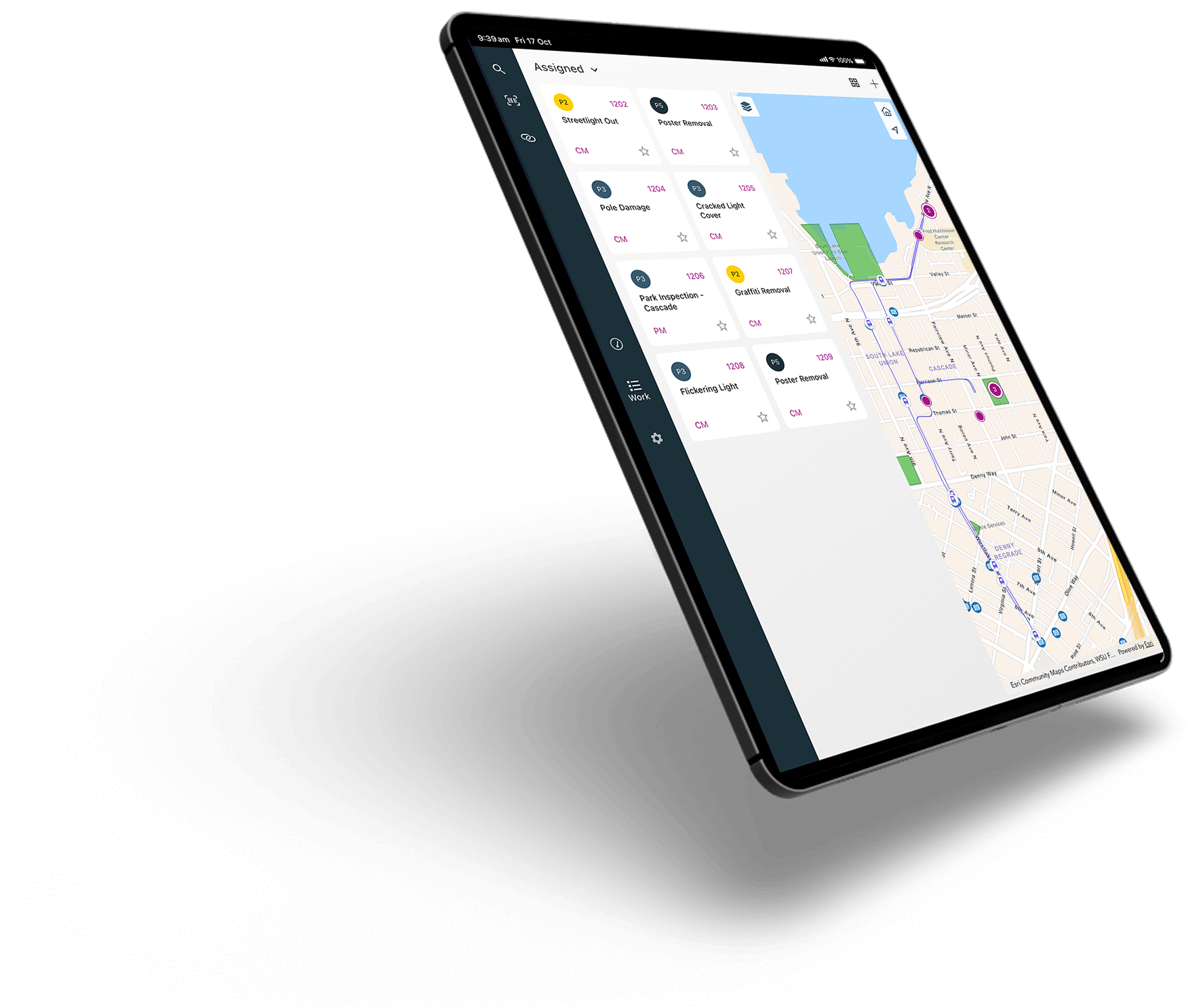
Opqo delivers a clean, efficient mobile interface for IBM Maximo—designed to be simple to buy, configure, and use. With no software to install on your servers and no upfront project required, Opqo makes getting started seamless and flexible. It’s fully process-driven and incredibly easy, yet powerful enough to support real-world field operations—even offline.


Page headline lorem ipsum
Why Choose Opqo?

Zero Upfront Commitments
Start with a free trial; pay only for what you use
Instant Setup
Download the app, enter your Maximo server details, and you're live—Opqo handles the rest

Configurable Within Maximo
Draws on your existing workflows and Maximo security model; editable via a built-in configuration script

Fully Operational Offline
Caches data locally and syncs when connectivity returns

Process-Led Widgets
Screens are built from modular, Maximo data-driven components for focused, actionable displays

Rapid Deployment Success Story
One client ran a proof-of-concept in under one month—from introduction to testing to IT sign-off
Key Features
Cross-Platform Native App
Supports iOS and Android devices, designed for both phones and tablets

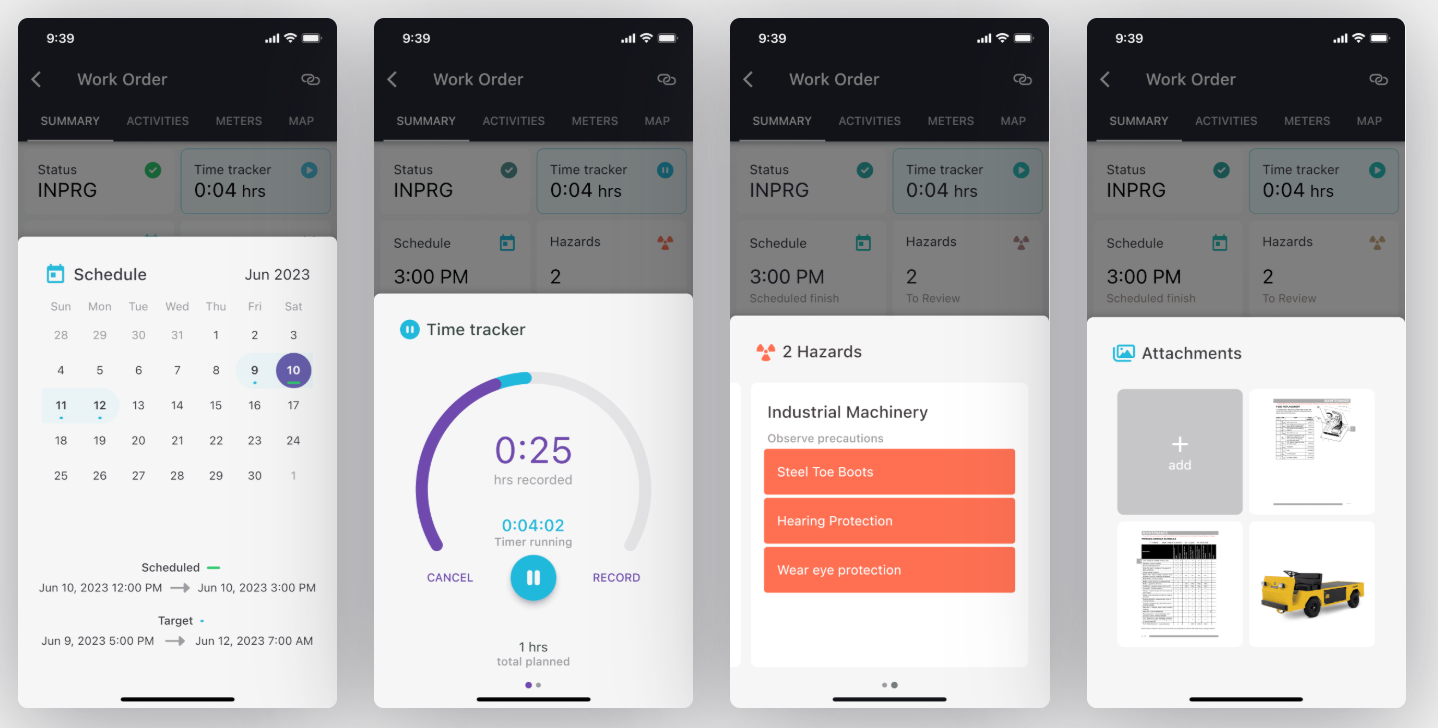
Robust Work Management
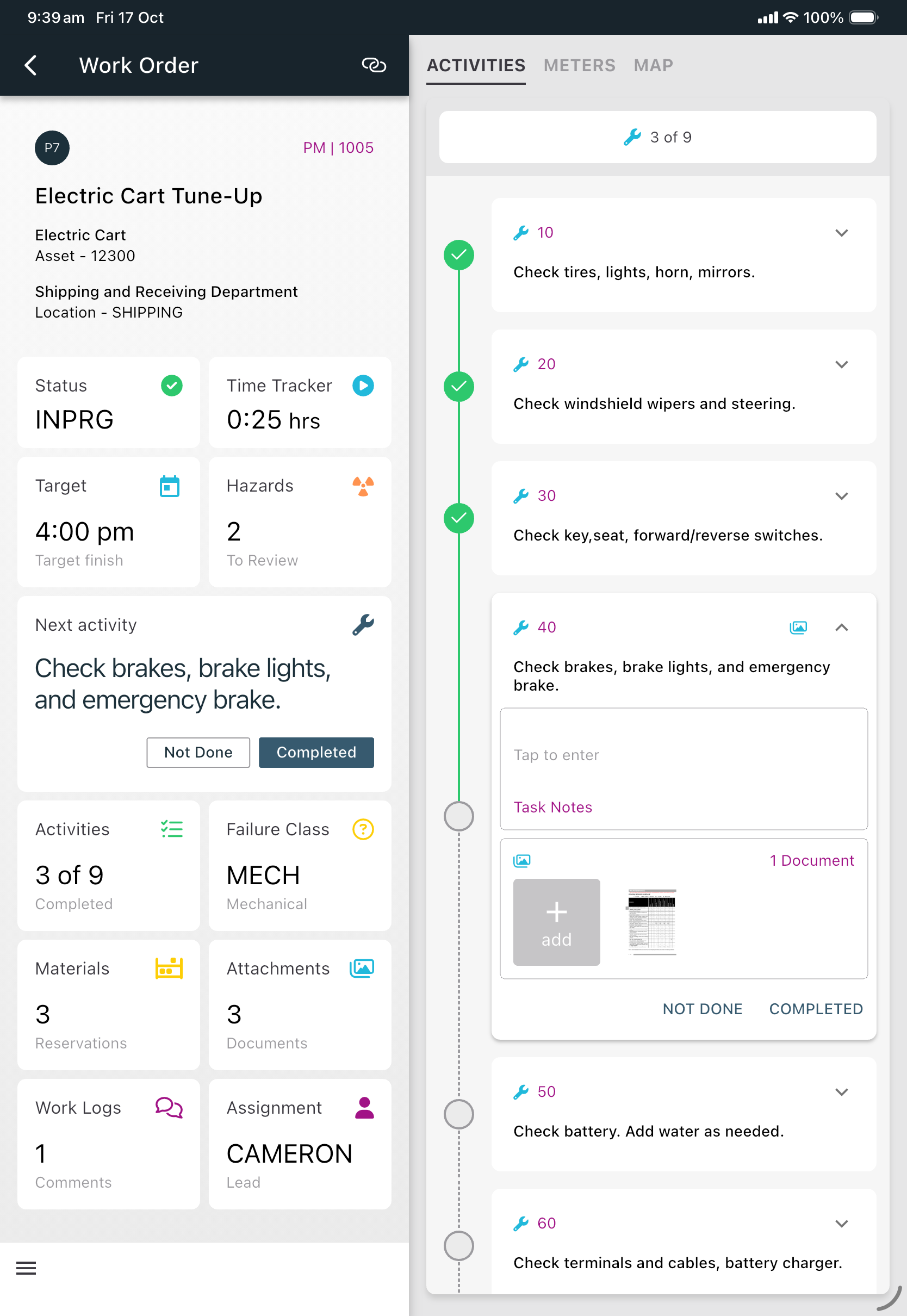
Manage work orders, inspections, asset discovery, timekeeping, failure reporting, meter readings, and more—all on the go
Mobile Inventory Controls
Handle storeroom activities such as picking, issuing, transfers, returns, cycle counts, and barcode/QR scanning—with support for generating and scanning item labels
Asset Data Collection Tools
Scan asset IDs or nameplates and capture detailed metadata using Maximo-defined forms
Secure, REST-Driven Integration
Connects to Maximo via REST API, respects Maximo’s existing user permissions, with no additional middleware required
Smart Connection Setup
Supports DNS-based auto-discovery, QR code setup, and MDM configuration for seamless Maximo environment connections
Simple Deployment Model
Doesn’t install to servers; leverages automation scripts and Maximo’s internal logic for setup and upgrades
Who benefits from Opqo?
Field Technician
Access or manage work in remote or disconnected scenarios.
Operations Supervisors
Seamless coordination and task visibility across teams.
Maximo Administrators
Easy deployment, customization, and maintenance leveraging Maximo logic.
Implementation Teams
Rapid rollout and proof of concept within weeks, not months
Frequently Asked Questions
What is Opqo and how does it work with IBM Maximo?
Opqo is a native mobile app for IBM Maximo that gives field teams a clean, process-driven interface for completing work in the field. It connects to Maximo using REST APIs, uses your existing Maximo workflows and security rules, and does not require extra middleware or software installation on your servers. It is designed to be simple to deploy, configure, and use while still supporting real-world field operations.
Does Opqo work offline for field technicians?
Yes. Opqo is built to work offline by caching data locally on the device and synchronizing automatically when connectivity returns. That makes it well suited for remote or low-connectivity environments where technicians still need to complete work orders, inspections, inventory tasks, and asset data collection without interruption.
What Maximo processes does Opqo support out of the box?
Opqo supports a broad set of Maximo processes, including work orders, work logs, time tracking, failure reporting, service requests, meter readings, inspections, asset data collection, and inventory management. It also supports storeroom transactions such as issues, returns, transfers, receiving, picking, staging, cycle counts, count books, and barcode or QR-based workflows.
How is Opqo different from other Maximo mobile apps?
Opqo is designed for fast adoption and low deployment friction. There is no server-side software to install, no large upfront project, and no need to rebuild your Maximo processes from scratch. It uses process-led widgets, existing Maximo logic, and a built-in configuration approach inside Maximo, which helps teams launch quickly while still supporting practical field needs like offline work, inspections, and inventory control.
Does Opqo support inspections, asset data collection, and GIS mapping?
Yes. Opqo can recreate Maximo inspection forms for mobile use, enforce conditional notes based on responses, capture meter readings and condition assessments, and trigger on-demand inspections by scanning an asset QR code or barcode. It also supports asset data collection through Maximo-defined forms, includes AI-assisted nameplate reading, and provides ArcGIS map capabilities with feature layers linked to Maximo assets and locations.
What devices and platforms does Opqo support?
Opqo is a cross-platform native mobile app built for iOS and Android and is designed for both phones and tablets. Its mobile-first design helps technicians and supervisors access focused, actionable Maximo information whether they are in the field, in transit, or reviewing work on a larger tablet display.
Who benefits most from Opqo?
Opqo is useful for field technicians who need fast access to work and asset data, operations supervisors who need better coordination and visibility, Maximo administrators who want simpler deployment and maintenance, and implementation teams that want to prove value quickly. According to the product sheet, one client completed a proof of concept in less than a month from introduction through testing and IT sign-off.
Opqo brings the “mobile” into Maximo—without complexity
Opqo brings the “mobile” into Maximo—without complexity
It's designed to simplify deployment, scale with your needs, and deliver field-ready Maximo access that’s both intuitive and powerful.
.avif)
